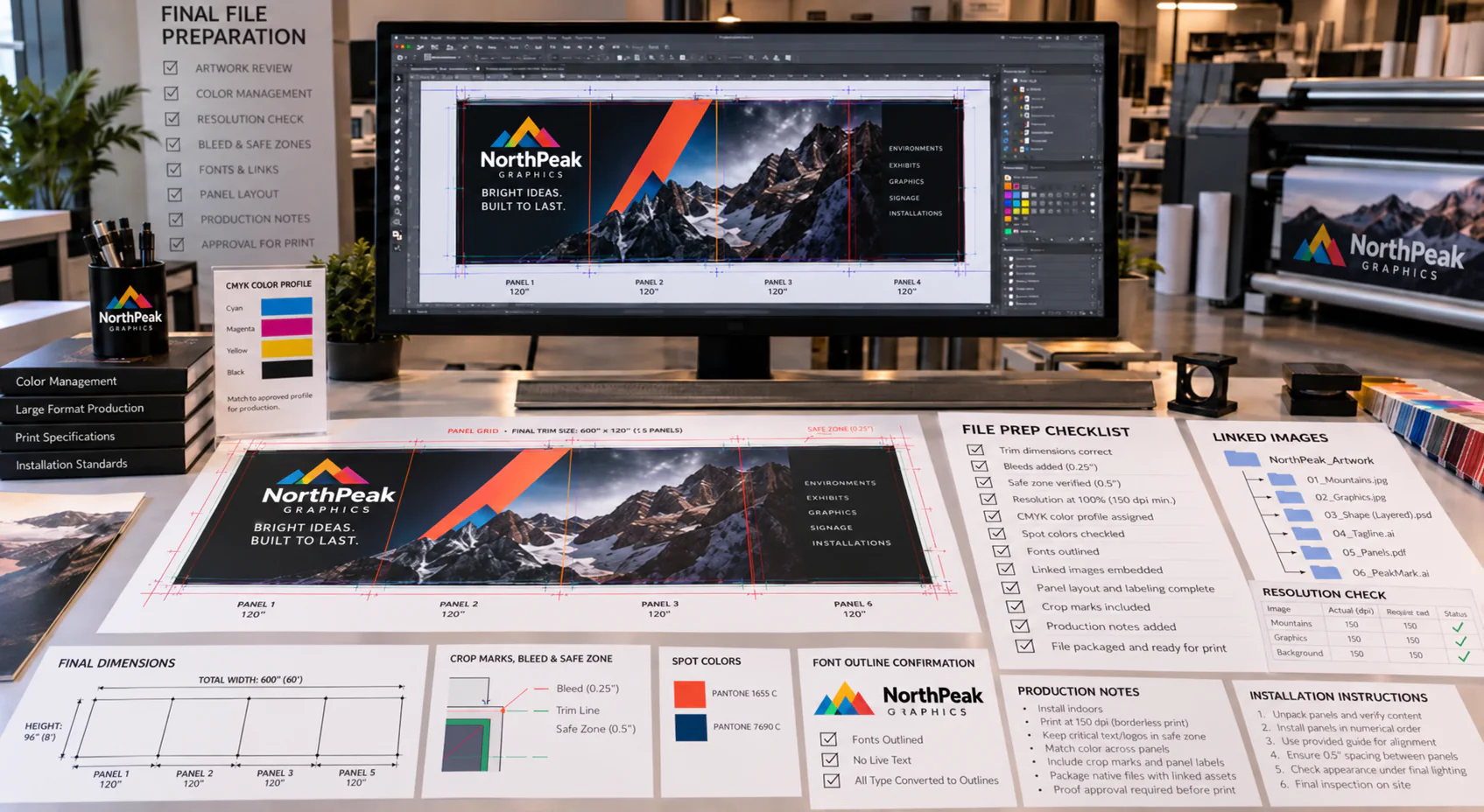
Key Elements of the File Prep Checklist for Grand Format
When we prepare environmental graphics, we start with the space, viewing distance, surface, and installation method. These factors guide scale, color, substrate choices, and finishing needs. As a result, our production files can support the way the graphics will actually function on site.
We also confirm final dimensions before artwork moves forward. Even small changes in wall measurements, window mullions, or floor transitions can affect panel breaks. Therefore, we review site details early so we can reduce rework later.
Resolution matters, but it depends on distance. A lobby wall viewed up close requires different image planning than a banner viewed from across a parking lot. So, we check image quality at the final output size, not only at the design size.
- Set artwork at full size or an approved scale with clear scaling notes.
- Include bleed, safe areas, crop marks, and panel overlap where needed.
- Convert or package fonts to prevent text changes during output.
- Use linked images that meet the required resolution for viewing distance.
- Confirm color mode, spot colors, and brand color targets before proofing.
- Label layers, panels, and files so production teams can follow the layout.
- Provide installation notes for seams, obstacles, and surface conditions.
Color planning is another key step. However, screens do not show color the same way printed materials do. We use proofs, material samples, and color references to align expectations before the full run begins.
Finally, we look at how the graphic will install. Doors, corners, fixtures, and uneven surfaces can change the file setup. Because of this, our team builds files with production and installation in mind.
Common Pitfalls When Preparing Files for Environmental Graphics
One common issue is artwork built without confirmed measurements. This can lead to awkward crops, visible gaps, or graphics that miss key sightlines. Additionally, changes made after production begins can affect schedule and cost.
Another issue involves low-quality images. A photo may look clear on a monitor but break down when enlarged. For that reason, we check key images at output size before moving into production.
We also see problems when files lack bleed or safe zones. Text, logos, or directional information can land too close to trim edges. Consequently, important content may appear crowded or risk getting cut during finishing.
Unmanaged fonts can create delays as well. If a font changes during transfer, the message may shift or reflow. To avoid this, we ask for outlined type or packaged font files when appropriate.
Color inconsistencies can also affect multi-panel graphics. For example, one wall can include several sections that must line up visually. Therefore, we review color builds, linked assets, and output settings before printing.
Finally, unclear file names create confusion. When several versions exist, production teams need to know which file is current. We use direct naming so each panel and revision stays easy to track.
Expert Tips and Best Practices for Flawless Grand Format Printing
We recommend starting with a short planning conversation before design begins. During that step, we can discuss materials, deadlines, installation access, and site conditions. Then, the artwork can match production needs from the beginning.
Next, we suggest designing with the viewer in mind. Environmental graphics often support wayfinding, branding, privacy, or promotion. Because of this, message hierarchy should stay clear from the expected viewing distance.
Benefits of Using a Detailed File Prep Checklist for Grand Format Projects
When we invest our time and effort into creating environmental graphics, there’s significant value in relying on a comprehensive File Prep Checklist for Grand Format. By consistently using a detailed checklist, we minimize errors that could delay production or result in less-than-ideal print outcomes. A thorough checklist helps us verify that all color profiles, resolution settings, crop marks, and bleed requirements are met before moving forward. This step-by-step approach supports us as we communicate with our design and production teams, ensuring that everyone is aligned on expectations and technical needs. Ultimately, this careful preparation leads to fewer costly revisions, less waste, and a more efficient workflow from artwork inception to installation.
How Accurate File Preparation Enhances Environmental Graphics
For our environmental graphic projects, accuracy in file preparation makes a measurable difference. When we prepare our files to the exact specifications outlined in the File Prep Checklist for Grand Format, the output aligns closely with our original creative vision. We maintain precise colors, crisp typography, and proper scaling – elements that are highly visible and impactful in large-scale environments. This attention to detail is critical, as grand format jobs often involve substantial investments in both materials and time. By taking steps to properly prepare our files, we reduce the likelihood of production issues and ensure that our graphics meet both our quality standards and client expectations. Proper file prep also streamlines the approval and printing process, making it easier to meet project deadlines and deliver consistent results.
Getting Professional Support and Resources for Seamless File Prep
We understand that file preparation for large-scale prints can present challenges. That’s why our team is always available to guide you through the process. By leveraging our experience and utilizing the File Prep Checklist for Grand Format, you gain access to knowledge that helps prevent common setbacks. If you have questions or need feedback, we offer resources and direct support to make file setup as straightforward as possible. And when you’re ready to move forward, grand format printing with us becomes a more predictable and efficient process. Our commitment is to help you achieve the full impact of your environmental graphics through proven preparation strategies, so your visuals always stand out.
FAQ
What are environmental graphics in large-scale projects?
Environmental graphics refer to visual elements such as signage, murals, and wayfinding systems that are integrated into large spaces. At Riot, we combine design and strategy to create these graphics, transforming environments into engaging experiences for everyone who visits.
Why is proper file preparation essential for grand format printing?
Proper file preparation ensures that colors, dimensions, and details are accurate in the final print. When our files are set up correctly, we avoid unnecessary delays and revisions, which not only save time but also maintain the high standards our clients expect from Riot.
What does a file prep checklist for grand format include?
Our file prep checklist covers critical areas such as resolution, bleed, color profiles, file types, and font management. Because grand format printing exposes every detail, we use our checklist to verify that each file meets the highest quality requirements from the start.
Which file formats do we recommend for grand format printing?
We typically recommend high-resolution PDF, TIFF, or EPS formats for grand format projects. Since these files retain embedded color profiles and maintain clarity at large scales, they lead to more accurate and impressive results for our environmental graphics.
What are common mistakes to avoid during file preparation?
Common errors include using low-resolution images, forgetting to include bleed, or neglecting to outline fonts. By staying alert and following our file prep checklist, we help you avoid such pitfalls, ensuring your project moves forward smoothly.
How do we ensure color accuracy in grand format prints?
We work with the proper color spaces (usually CMYK for print) and embed consistent color profiles in every file. Transitioning from screen to print can introduce color shifts, so our experts always double-check color accuracy before printing begins.
Can we accommodate last-minute changes after file submission?
While we strive to be flexible, last-minute changes can disrupt timelines and increase costs. However, because our file prep checklist streamlines the process, it’s easier to handle minor tweaks efficiently and still meet your project’s goals.
Why is bleed important for grand format graphics?
Bleed ensures that the graphic extends beyond the trim area, preventing white edges after cutting. In large-scale prints, even a small error can be very noticeable, so adding bleed to your file is one of our most emphasized best practices for flawless results.
What resources do we provide to help with file preparation?
Our expert team provides guidance, detailed templates, and comprehensive file prep checklists for every project. With these resources, you benefit from our experience and industry best practices, creating peace of mind throughout the process.
How does accurate file preparation enhance project success?
Accurate file prep prevents costly errors, reduces production delays, and ensures that environmental graphics look stunning in real-world applications. Thus, using our proven file prep checklist leads directly to successful, impactful installations every time.